Register a free account today to become a member! Once signed in, you'll be able to contribute to the community by adding your own topics, posts, and connect with other members through your own private inbox! INEOS Agents, Dealers or Commercial vendors please use the contact us link at the bottom of the page.
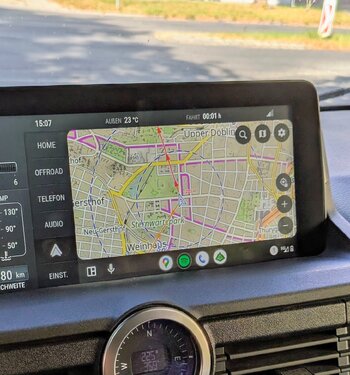
That took long enoughA big step forward. Locus Maps on android auto.
For what is worth, to assist me in remote areas without cellular service, I use the Bad Elf GPS Pro (https://bad-elf.com/). It’s a Bluetooth GPS receiver that connects to your phone or tablet and works seamlessly with apps like Google Maps and GAIA GPS mapping (make sure to download the maps before you head out). I have used the Bad Elf Pro extensively with the GAIA GPS Maps in areas without service, and it has been very accurate, reliable for navigation and recording my track.
It’s my understanding that the bad elf pro is not considered a legacy product, but Bad Elf has a newer device — the Bad Elf Flex Mini — which is reported to be even more accurate. I’m not entirely certain, but there may be ITAR export restriction, so availability outside the U.S. could be limited.
Do non cellular tablets, like the Ipad, have built in GPS?The GPS built into most phones will likely get you good enough coverage, at lower power usage, than this (?) if you are using Google maps, I suspect the phone isn't far. The meter grade accuracy should be fine for most automotive needs![]()
Outside of the apple ecosystem, almost everything does gnss, with all four of the major providers.Do non cellular tablets, like the Ipad, have built in GPS?
Wenn die Karte gut ist, bildet automatisches Routing eine solide Grundlage für die Routenplanung. Ich habe jetzt ein bischen herum gespielt und das MTB-Profil passt dafür meistens recht gut. Falls die Karten jedoch unzureichend sind, greife ich am liebsten auf Satellitenbilder zurück. Ich habe allerdings noch nicht herausgefunden, wie man diese in Locus Map offline verfügbar macht. Ein Cache für 30 Tage würde mir völlig ausreichen, aber ich weiß nicht, wie man das gezielt entlang einer geplanten Route oder für ein bestimmtes Gebiet einstellt. Habt ihr diese Nuss schon geknackt?Zur Zeit nutze ich nur Fahrrad und gelegentlich Straße.
Die Profile hängen vom Router ab, also entweder BRouter (geht m.W. auch Offline), https://brouter.de/brouter-web/#map=5/50.990/9.860/osm-mapnik-german_style, oder wenn man das lieber hat, LoRouter von Locus Map, der aber nur Online zugreifbar ist. Dort kann man Routing-Attribute einstellen. BRouter gibt es als App im Appstore und lässt sich nach der Installation in Locus Map auswählen.
Für 4x4 habe ich das noch nicht genutzt.
Ein automatisches Routing käme da ohnehin kaum in Frage. Ich habe (mit dem Fahrrad) das ein oder andere mal schon Routen durch Wald und Feld geplant. Das aber über Wegpunkte - weil Autorouting das kaum kann: Geländerouten lassen sich nicht in der Art kategorisieren wie Straßenrouten. Da muss man selber ran - zumindest nach meiner Erfahrung.
Ein Garmin Tread habe ich noch nicht probiert. Zaubern kann das aber auch nicht, und spätestens wenns beim Waten mal 20 cm tiefer geht als für das Fahrzeug gut ist, z.B. weil der Wasserstand nach einer Regenwoche einfach höher ist, ist Schluss mit der Autorouterei.