The Grenadier Forum

Register a free account today to become a member! Once signed in, you'll be able to contribute to the community by adding your own topics, posts, and connect with other members through your own private inbox! INEOS Agents, Dealers or Commercial vendors please use the contact us link at the bottom of the page.

Show us your mods.

Are these the USBs from centre console/glovebox so connect for android auto/carplay
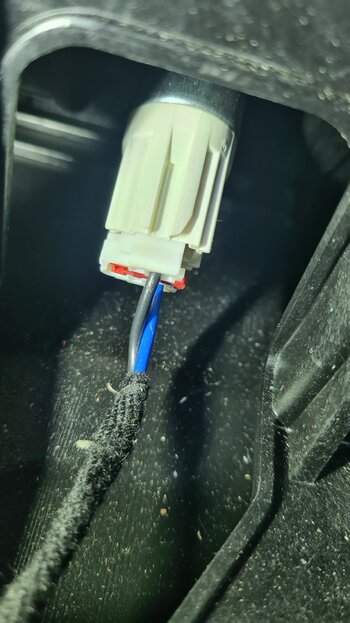
The 12v off the cigarette lighter socket was a safer bet, but I did snap of the red tab when trying to disconnect the plug...

I was contemplating taking the feed to the new USB panel off the carplay connection in the centre console, however decided to keep the android carplay via the original connection in the centre console, and ended up using the feed off the cigarette lighter socket. The original carplay connection is not 100% reliable for me as it is, so wasn't going to risk introducing any additional variables.
 

Attachments

  • 20260415_155754.jpg
    20260415_155754.jpg
    2.4 MB · Views: 0
The 12v off the cigarette lighter socket was a safer bet, but I did snap of the red tab when trying to disconnect the plug...

I was contemplating taking the feed to the new USB panel off the carplay connection in the centre console, however decided to keep the android carplay via the original connection in the centre console, and ended up using the feed off the cigarette lighter socket. The original carplay connection is not 100% reliable for me as it is, so wasn't going to risk introducing any additional variables.

Seems a more practical storage bin. 3d printed? File available?
 
I installed the Supra shifter today. I used Toyota part number 33550-WAA01 and basically followed the instructions that Owl Vans published on YouTube here. I was able to remove my OEM shifter without damaging it and have a few tips on that.

Here are the tools I used - a T-10 bit driver, an X-Acto chisel blade, two plastic spudgers (used in electronics work), some tweezers and an O-ring pick.

View attachment 7926702

Here's how I removed the OEM shifter panel that Owl said was glued on:

View attachment 7926701
The sharp blade slips in quite easily compared to my plastic panel tools. Don't twist it! Then I slipped in a spudger to finish removing the panel. This outer plastic panel is actually held on with a thin double-sticky film tape. 3M sells the same stuff to hold body trim on and it's often avaialble at auto parts stores that carry body supplies. The tape does not cover the white letters (on the back side).


View attachment 7926703

The chisel let me slide the spudger in easily. I slid the spudger up and down the right side, then pushed it in above the "R". The reason for this is that the white letters are backlit and there is no adhesive film there, so there's a small chance you could scratch the white plastic and it would telegraph the scratch when illuminated . . . so go above or below the letters and work the plastic panel off with the spudger.

The next step is to remove the lock button and I did this differently than Owl did:

View attachment 7926704

Push the spudger in the hole as shown and it will release the lock button. Remove that, then pry off the black plastic piece (with the "P" still attached) by starting at the top with the X-Acto chisel followed by the spudger again.

The rest of Owl's instructions worked just fine. I did find one thing that really, really needed to be addressed. When I took the Supra shifter apart (per Owl's instructions), I thought to inspect the ribbon connector with a 10X loupe. Just out of college, I worked in electronics assembly and know these kinds of connectors ocassionally have problems. Sure enough, mine did:

View attachment 7926705

I magnified the area of interest . . . see the bent pin? That lays dangerously close to the adjacent land on the ribbon cable, so I'm not sure this new shifter would have worked as received from Toyota. I bent the pin back in place and . . .

View attachment 7926706


. . . everything works as expected. Yay! And I do like the look.

Many thanks Glen. Will follow your instructions combined with those of OWL.
 
Yep, I used a file... and an old chopping board that I cut up and finished by hand!
While filing, kept thinking that I should have bought that 3D printer for my last birthday...
I bought a Bambu X1 Carbon for my birthday last year. I have a lot of "hobbies" and quite frankly I don't know how I survived without it all these years.. the irony is that the printer isn't a "hobby" it's just a tool to make stuff like that without fighting with it coming up with some kind of work around using different materials. The trickiest part is learning how to use a design program, that's a steep learning curve.
 
I bought a Bambu X1 Carbon for my birthday last year. I have a lot of "hobbies" and quite frankly I don't know how I survived without it all these years.. the irony is that the printer isn't a "hobby" it's just a tool to make stuff like that without fighting with it coming up with some kind of work around using different materials. The trickiest part is learning how to use a design program, that's a steep learning curve.

Have you tried giving AI a go for the design things? In my somewhat limited experience, it seems to cough up fairly accurate STL's that I can then mingle with for final touches and material specific fluff
 
Back
Top Bottom