The Grenadier Forum

Register a free account today to become a member! Once signed in, you'll be able to contribute to the community by adding your own topics, posts, and connect with other members through your own private inbox! INEOS Agents, Dealers or Commercial vendors please use the contact us link at the bottom of the page.

General INEOS Grenadier A/C Issue - What finally Fixed Mine

Gilma

Grenadier Owner
Local time
11:54 AM
Joined
Nov 14, 2025
Messages
2
Location
Dallas, TX
Sharing this in case it helps someone else.

I have a 2025 INEOS Grenadier Trialmaster, purchased in November, and I’ve been dealing with the A/C issues many of you have probably heard about:

• Rear vents blowing super hot
• One side cold-ish
• The other side ambient to warm

Over the past few months, following the service protocols the dealer replaced:

• The controller
• The valve
• The A/C box

They also:

• PicoScoped the vehicle
• Changed the coolant
• Updated software
• Reset modules

I tried all the usual suggestions too — boot-up procedures, making sure everything was off before shutdown, etc. Nothing worked.

What finally fixed it?

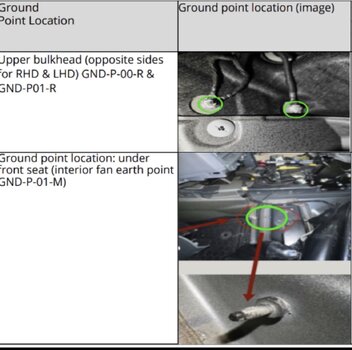
The dealer went full deep-dive and traced every wire. Turns out one of my ground straps, one unrelated to the A/C, wasn’t connected properly. Once that was corrected, the A/C started working exactly as it should. It was the ground strap under the seat and under the flooring.

So if you’re dealing with the same A/C symptoms and haven’t gotten a real fix yet, it might be worth having the ground straps checked before throwing more parts at it.

Hope this saves someone some time and frustration. Still love my Greeny despite this hiccup. Crossposted on other platforms so sorry if you have seen this already.

TL;DR: have the dealer check the ground straps, even those unrelated to the AC system. What fixed mine was the the ground point under the driver seat. It is a 10 mm bolt located under the flooring near the center console.

IMG_6212.jpeg
 

Attachments

  • IMG_6212.jpeg
    IMG_6212.jpeg
    352.3 KB · Views: 0
I will check mine!! Once in a while my AC blows super hot from the rear vent. I’ve never bothered mentioning it to the dealer, etc… maybe this is the cause and a simple fix!
 
I will check mine!! Once in a while my AC blows super hot from the rear vent. I’ve never bothered mentioning it to the dealer, etc… maybe this is the cause and a simple fix!
Don't put up with it, get it fixed. The system can be far better than you must be having. When blowing cold at the rear you must have it very tepid at the front.
Spending time getting all the air out and also this fix will help you have a nearly, only nearly, normal system.
You may have other issues so don't put up with that just because loud voices say the system is rubbish
 
• Rear vents blowing super hot
• One side cold-ish
• The other side ambient to warm

Over the past few months, following the service protocols the dealer replaced:

• The controller
• The valve
• The A/C box

They also:

• PicoScoped the vehicle
• Changed the coolant
• Updated software
• Reset modules

I tried all the usual suggestions too — boot-up procedures, making sure everything was off before shutdown, etc. Nothing worked.

What finally fixed it?

The dealer went full deep-dive and traced every wire. Turns out one of my ground straps, one unrelated to the A/C, wasn’t connected properly. Once that was corrected, the A/C started working exactly as it should. It was the ground strap under the seat and under the flooring.

Thanks for posting. I got very excited about this and went to clean up the three ground points shown in the picture, plus an additional one under the accelerator pedal. Sadly this did not fix my issue.

My issue, like yours and many others, is that the system blows hot all (or some of) the time, literally within a 3-4 minutes of driving. Basically as soon as the vent fans are turned on, the coolant valve opens (allowing hot coolant into the heater core), but the valve does not close (regardless of temp setting) until the car is restarted (with the vent fan turned off). This is simply a control issue, there is no problem with the valve, the actuator, the A/C box etc., but something that is controlling that actuator has gone crazy. I notice that you had the controller, the valve (which I assume is the water valve as there is only one) and the A/C box (which seems mad given it's just a plastic box and a few flaps - it only controls air flow, not temperature) replaced to no avail. That's what made me clean up the ground straps, something that others have mentioned here before. I have done a deep dive into the A/C system (mechanical parts only) so I know how it works and if it only blows hot then it's because the water valve is not closing - there is no other reason. There is a small electric heater in the unit, but apparently that is only used when the system is in defrost mode, although I cannot verify that.
If you remove the lower side panel (covering the footwell heater outlets) on the passengers side you can see the coolant pipe and almost see the coolant valve. With a boroscope you can see it opening and closing.
Anyway, thanks again and I'm glad yours is now working!

Maybe there are more ground points that I could clean up...
 
If the electric heater only works in defrost haw do I get immediate heat from face or feet vents when starting after a couple of days.
Can your electric heater be stuck on?
Permanent heat is an unusual problem, mostly cool air and warm at rear plus various other combinations. All sorted by clearing air from the system.
 
How much of a pain to check this in my driveway?
I removed the 4 mounting screws from both front seats and tipped them back onto the rear seats, making sure that none of the wires connected to the seats were stretched. This gives you full access to the ground points. Technically it's only the ground point under the seat that requires removal of the seat, but the previous owner had split coffee down the sides of the console and onto the carpets, on both sides so I removed both. Access is limited and it can be fiddly to clean up the ground points, but using a little paint stripper, some wire wool and an M6 die I managed to get them shiny. I used plenty of contact cleaner after this before putting the terminals back onto the ground points.
 
Back
Top Bottom