The Grenadier Forum

Register a free account today to become a member! Once signed in, you'll be able to contribute to the community by adding your own topics, posts, and connect with other members through your own private inbox! INEOS Agents, Dealers or Commercial vendors please use the contact us link at the bottom of the page.

TPMS programming for MX sensors with older AUTEL TS408/TS508 (pre-INEOS) guide

SubLegend

Grenadier Owner
Lifetime Supporter
Local time
3:37 AM
Joined
Oct 13, 2025
Messages
6
Location
Fairfax Station, Va
1. Procure an AUTEL scanner. I got this beauty on eBay. I recommend a 408 or 508 without WiFi. (You don’t want it updated so it can still manually program). It had v1.09, so no Grenadier listed.
IMG_0098.jpeg

2. INEOS uses an older receiver made by continental/vdo. The protocol to match is 407006UA0A.
IMG_0099.jpeg

3. Set to Europe. (I looked through a bunch of old Nissans to find one that matches the protocol) Set to Renault Express 05/2021-12/2022 (433 MHz).
IMG_0095.jpeg

4. Read your sensors.
IMG_0094.jpeg

5. I manually set up my right front MX sensor to match. Then I tested by turning on the car and manually triggering the MX sensor. Since I didn’t move my car the other sensors did not trigger. It instantly went to 0 psi. Success!!
IMG_0096.jpeg
 
You can update the software on the TS508 non WiFi. It will give you the Grenadier without removing the copy features.
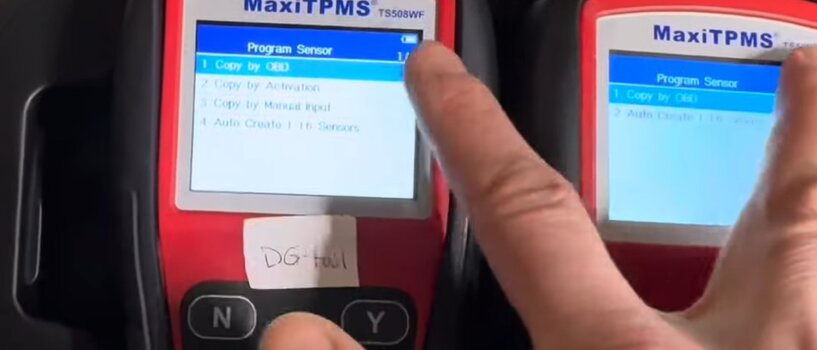
I looked into updating my TS408. Per the AUTEL website, it removes the ability to manually input the ID(HEX). It does add the Grenadier, so it would allow you to read your own sensors - but I don’t know how you would write to them since you only have the option to auto create: (not my image below). I wouldn’t risk it …
IMG_0652.jpeg
 
That is correct for the TS508WF.
The TS508 can be updated without losing those features.

Note: If you have a TS508WF please call Autel and complain. Thanks...
 
My Autel scan tool seems to contradict some other user’s experiences here. I have an Autel TS508WF purchased in 2016 (I believe . . . at least that’s the software copyright date). It has Ineos Grenadier in the vehicle list and I can read Ineos OEM sensors (Continental 433 MHz) and store their hex ID for use in writing that to an Autel MX sensor or I can enter an arbitrary hex ID and write that. (Note that Autel has you omit the second digit of another manufacturer’s hex ID when entering it manually.)

Here is some data from the info screen:
Sys Software Version: V1.30
Hardware Version: V1.00
Sensor Version: V7.70
Vehicle Version: V3.20
Manufacture Date: 06/13/2024 (this is incorrect and is likely from the last software update)

I looked recently on Autel’s site and don’t see any software updates available, as if they have discontinued support.
 
My experience was purchasing a new TS508WF.

When I did the initialization it did the software update. The Ineos was on the list, however, the 2 manual clone options were not there.

The Amazon site I purchased it from showed these options on the sample box. When I called Autel they said these options were no longer available.

I returned the TS508WF and purchased a used TS508.

I assume that Autel has changed the hardware on the TS508WF at some time and it created an issue with these features.

This the info from the unit that would not work.
20251215_103653.jpg
 
My experience was purchasing a new TS508WF.

When I did the initialization it did the software update. The Ineos was on the list, however, the 2 manual clone options were not there.

The Amazon site I purchased it from showed these options on the sample box. When I called Autel they said these options were no longer available.

I returned the TS508WF and purchased a used TS508.

I assume that Autel has changed the hardware on the TS508WF at some time and it created an issue with these features.

This the info from the unit that would not work.
View attachment 7918582
Looks you have different sensor and vehicle versions. I presume the entry “Sys Software Version“ refers to the updated software and - interestingly - we have the same version. Are you looking in the Advanced menu for the actions you can perform (that’s where I see all the capabilities I mentioned in my previous post)?
 
The software on the left has "copy by activation" and "create by manual input". The software on the right had these options removed.

They are both TS508WF models.
 
I was on the Autel site a few weeks ago (autel.us) and couldn't find any updates (or even an update page) for the TS508WF. One Google search this morning and the first result is their update page. Weird.

In a video on their update page, Autel says if you don't update to their latest software, the TS508 or TS508WF won't be able to read/write the new "gen 3" MX-1 sensors that have the 315/433 MHz capability. Also weird because I apparently have the older software that still includes the ability to write random hex codes AND my TS508WF can absolutely read and write the new MX-1 dual-band sensors . . . at least the ones I purchased and installed (9 of them) a few weeks ago.

My take is Autel may be lying about the necessity to update the TS508WF to their new software version. I can't immediately think of a reason they would do that except perhaps they want you to upgrade your software so they comply with some jursidiction's regulations. In the video, they urge you to update every two or three weeks . . . what? I've turned autoupdate off in mine in case it tries to do so over the WiFi connection.
 
Using a non-updated TS508, I cloned five 1-Sensor Metal TPMS sensors to match the factory sensors. The TS508 was not aware of the Grenadier specifically but that was not an impediment to the programming.
You can update the TS508 (non WF) and get access to Ineos Grenadier without loosing the "copy via activation" and "create via manual input" functions.
 
Back
Top Bottom