Thanks for the reply.
I think it will be the second option; I understand you couldn't make these adjustments yourself. I'll have to go back to the dealership
@Manuel4x4 Assuming you have confirmed there is nothing fouling the selector lever it's fairly straightforward to adjust the linkage. It is something you could do yourself if you're mechanically inclined - especially if a trip back to your dealer is not convenient. There are four trim panels to remove and install but they're simple enough to do. I've included the Remove and Install (R&I) instructions below.
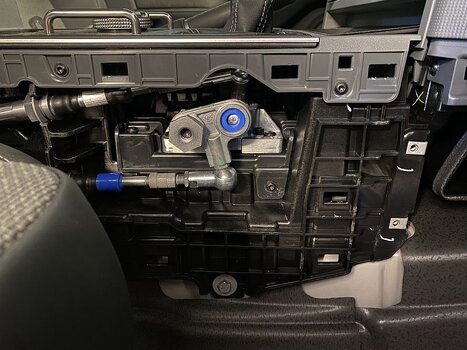
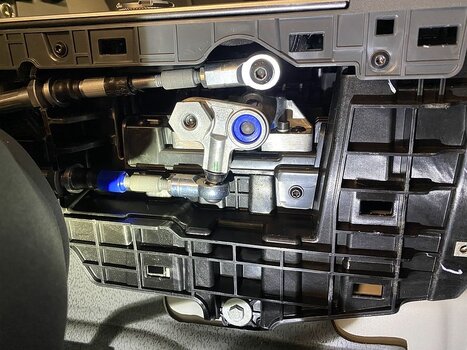
Take note of the ball socket adjustment for the High-Low selector. If you're having difficulty getting Low range you may need to do a <clockwise adjustment> Do one turn at a time then check. Keep count of the # of turns you make and the direction so you can go back the the start point if you completely mess it up!
Ineos don't provide an orientation so I would assume clockwise to be winding the ball socket further onto the cable end, i.e. it's a right-hand thread. After you get Low range engagement working ensure you check that High range engagement is still ok.
Trim panel removal in order. Reverse order to refit.
Instructions below (scroll down).
1. End cap
2. Knab cover
3. Upper console lower left panel
4. Lower console lower left panel
Workshop manual
link for the selector adjustment (user login account required)
HIGH-LOW Range Adjustment (upper ball socket - red highlight below)
1. Remove the left Lower-Console Side Panel.
2. Release the Ball Socket from the Gear Selector Base.
3. Loosen the nut that attaches the Ball Socket to the Adjuster.
4. NOTE: It is recommended that you turn the Ball Socket one time and then do a test of the selector:
- If the HIGH gear does not engage correctly, turn the Ball Socket counter-clockwise.
- If the LOW gear does not engage correctly, turn the Ball Socket clockwise.
- Turn the Ball Socket as necessary.
5. Tighten the nut that attaches the Ball Socket to the Adjuster.
6. Install the Ball Socket to the Gear Selector Base.
7. Use the Transfer Box Selector to make sure that you can engage and disengage the High and Low-range gears.
8. Do steps 2 thru 7 again as necessary until the Transfer-Box Selector Cable is correctly adjusted.
Differential Lock Adjustment (lower ball socket - green highlight below)
9. Release the Ball Socket from the Gear Selector Base.
10. Loosen the nut that attaches the Ball Socket to the Adjuster.
11. NOTE: It is recommended that you turn the Ball Socket one time and then do a test of the selector.
Turn the Ball Socket as necessary.
12. Tighten the nut that attaches the Ball Socket to the Adjuster.
13. Install the Ball Socket to the Gear Selector Base.
14. Use the Transfer Box Selector to make sure that you can engage and disengage the Differential Lock.
15. Do steps 9 thru 14 again as necessary until the Transfer-Box Selector Cable is correctly adjusted.
16. Drive the vehicle a short distance and make sure that the Transfer Box Selector operates correctly.
17. Install the left Lower-Console Side Panel.
Trim Panels
4. Lower Console Left Side Panel
Remove
1. Remove the Upper-Console Lower Left Side-Panel.
2. Remove the two screws that attach the Side Panel to the Centre Console Armature.
3. Release the Side Panel from the 19 clips that attach it to the Lower Console Assembly.
4. Remove the Side Panel.
Forum Note: Use a flat trim tool to release the 19 clips. There is no need to remove the seat but it is helpful to move it back and forth as you work along the clips. The panel can be lifted up when fully released.
Install
5. Move the Side Panel into the correct position.
6. Install the Side Panel to the 19 clips that attach it to the Lower Console Assembly.
7. Install and tighten the two screws that attach the Side Panel to the Centre Console Armature.
8. Install the Upper-Console Lower Left Side-Panel.
2x screws here:
3. Upper Console Lower Left Panel
Remove
1. Remove the Knab Cover.
2. Remove the screw that attaches the Side Panel to the IP Carrier.
3. Release the Side Panel from the five clips that attach it to the Instrument-Panel Carrier.
4. Remove the Side Panel.
Install
5. Move the Side Panel into position.
6. Install the Side Panel to the five clips that attach it to the Instrument-Panel Carrier.
7. Install and tighten the screw that attaches the Side Panel to the Instrument-Panel Carrier.
8. Install the Knab Cover.
2. Knab Cover
Remove
1. Remove the Upper Console End Cap.
2. Remove the three screws that attaches the Knab Cover to the Instrument-Panel Carrier.
3. Release the Knab Cover from the four clips that attach it to the Upper-Console Lower Cover.
4. Disconnect the Electrical Connector from the Lamp.
5. Release the Harness from the clip that attaches it to the Knab Cover.
6. Remove the Knab Cover.
Install
7. Move the Knab Cover into position.
8. Install the Harness to the clip that attaches it to the Knab Cover.
9. Connect the Electrical Connector to the Lamp.
10. Install the Knab Cover to the four clips that attach it to the Upper-Console Lower Cover.
11. Install and tighten the three screws that attach the Knab Cover to the Instrument-Panel Carrier.
12. Install the Upper-Console End Cap
3x screws:
1. Upper-Console End Cap
Remove
1. Remove the Door Main Sealing.
Forum Note: You only need to pull a short section of the door seal away from the door frame adjacent to the end cap.
2. Release the End Cap from the six clips that attach it to the Instrument-Panel Carrier.
(it's a tight fit!)
3. Remove the End Cap.
Forum Note: Pull the cap towards the seat. Keep it parallel to the side of the vehicle.
Install
4. Move the End Cap into position.
5. Install the End Cap to the six clips that attach it to the Instrument-Panel Carrier.
6. Install the Door Main Sealing.