Here is some tips for setting up Android Auto on your Grenadier if the phone does not recognize the Grenadier.
When I was at the dealership to pick up my vehicle, the dealer walked me through connecting my Pixel9 Pro. I was surprise that despite being connected, my Android Auto would not start up. I figured out that you need to go into the app and set up the Grenadier. This could be phone related or vehicle related in terms of not automatically recognizing the Grenadier in Android Auto.
First step: go to settings on your phone
Second step: go to Apps on your phone
Third step: go to Android Auto app in settings, click. Now, click additional settings in the app
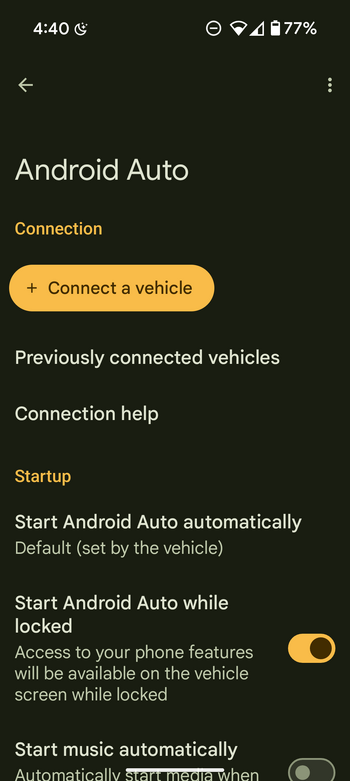
Fourth step: click Connect a vehicle
And that's it. You can add the Grenadier and you will have access to Android Auto. You can also customize it on this page too.
Pictures for those that need some visual help.
When I was at the dealership to pick up my vehicle, the dealer walked me through connecting my Pixel9 Pro. I was surprise that despite being connected, my Android Auto would not start up. I figured out that you need to go into the app and set up the Grenadier. This could be phone related or vehicle related in terms of not automatically recognizing the Grenadier in Android Auto.
First step: go to settings on your phone
Second step: go to Apps on your phone
Third step: go to Android Auto app in settings, click. Now, click additional settings in the app
Fourth step: click Connect a vehicle
And that's it. You can add the Grenadier and you will have access to Android Auto. You can also customize it on this page too.
Pictures for those that need some visual help.