The Grenadier Forum

Register a free account today to become a member! Once signed in, you'll be able to contribute to the community by adding your own topics, posts, and connect with other members through your own private inbox! INEOS Agents, Dealers or Commercial vendors please use the contact us link at the bottom of the page.

Infotainment screen creak

HereinDaRockies

Grenadier Owner
Local time
10:11 PM
Joined
Sep 12, 2024
Messages
1,075
Location
Denver, Co
I think this creak contributes the lack of solidness when my IG goes on washboard and bump roads. I keep hearing rattles and creaking from the dashboard area

Has anyone fixed this kind of creak ?
 

Attachments

  • My Movie 3-540p30.mov
    4.7 MB
I think this creak contributes the lack of solidness when my IG goes on washboard and bump roads. I keep hearing rattles and creaking from the dashboard area

Has anyone fixed this kind of creak ?
Did you come to a conclusion and a fix? I’ve got a similar sounding noise and it’s driving me nuts.
 
Did you come to a conclusion and a fix? I’ve got a similar sounding noise and it’s driving me nuts.
Stuff something between the screen and the piece of plastic that has the grenadier logo, which faces forward.

You need to either create more gap(so the two surfaces don’t make contact) or fill the gap with something sound deadening.
 
That makes sense. I’ve had a lot of dust in the cabin from an adventurous summer. I’ll look into it. Thanks!!
 
Stuff something between the screen and the piece of plastic that has the grenadier logo, which faces forward.

You need to either create more gap(so the two surfaces don’t make contact) or fill the gap with something sound deadening.

Yep, the fix from @HereinDaRockies is the magic needed to stop the creaking. I did the same fix. I don't have a photo and the docs portal is not playing nice for me today so I cannot pull up a diagram :rolleyes:.
The silver trim piece behind the infotainment screen has a long flat back. It's this section which chafes against the back of the infotainment screen housing after a bit of heat and dust. That's the glorious creak sound. If you want to test it slip a business card or a similar thin non-plastic thing under the top edge. That should be enough to separate the surfaces and stop the noise temporarily. You might need to try this in a couple of spots.

This was my typically over-engineered fix:

Pop the silver trim piece off. Ends first then the back. The ends move outwards away from the screen like you're turning a U into a V. Today you're a Master Trim Whisperer. Go gently now. This is thin trim and should not need tools.
If you don't have a standard compliment of three hands and the ends are fighting you while you unclip the back, slip some business cards under the ends to distract them while you ease the back out.
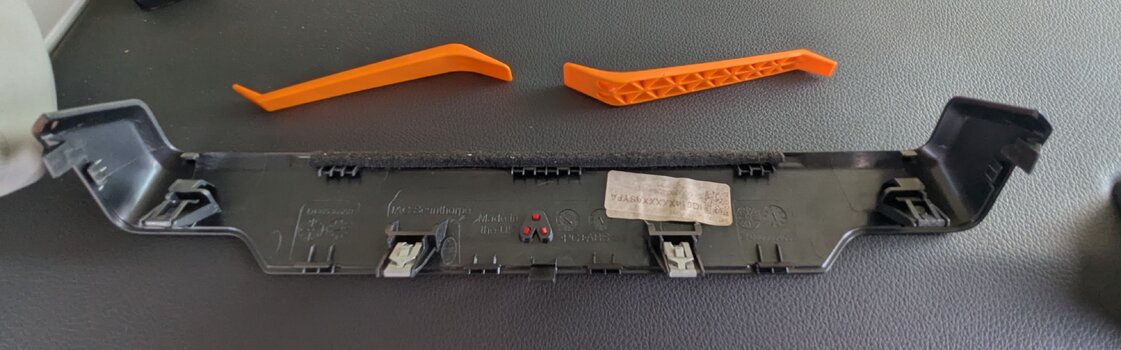
With the trim safely in one piece on your bench🤞, apply a narrow (~6mm/0.25") strip of thin tape inside the top and bottom area of the back section. Study how the trim fits on and put the right amount of tape on the obvious contact areas. You're aiming to have the tape separate the plastics. You'll soon know if you nailed it. Less is more. If you use tape that is too wide or too thick it will stop the trim from fitting correctly.

Any thin tape will suffice. As a guide, plastic electrical insulation tape might be too thick. I used some strips of Tesa 4661 cloth tape because I have it in my toolbox.
Double sided tissue mounting tape is a viable option but test it with the outer backing paper left on. You're not trying to glue the trim in place (or are you?)
You could probably use masking tape/painters tape but it may wear through after a while.
A gutsy packing tape or cellulose tape might be ok but they're plastic so results might vary.
...etc.
 
Dealer had my dash out to fix the HVAC and now I have the creaking sound. I seem a bit dense today and can’t follow the trip removal explanation. Does anyone have a link a diagram of how the trim fits?
 
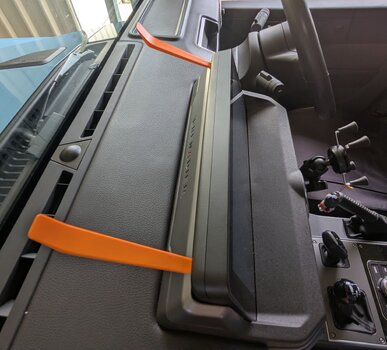
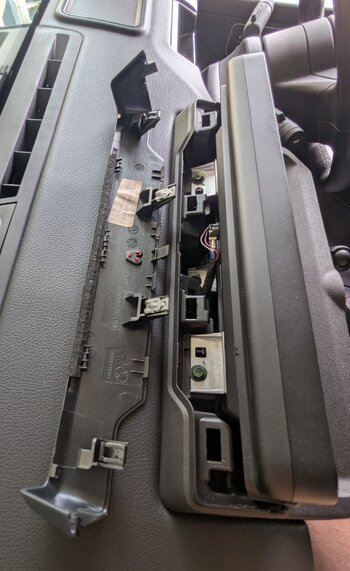
My trim has been off before so obviously it's a little easier now. I am at my vehicle now so I just popped it off again to grab these pics for you.
Try inserting some trim tools as shown. Lever the gap open a bit and the ends might release. If they don't, open up the end gaps slightly as I described above.
Most of the clips are vertical. To refit the trim align the pegs at the bottom then press down and towards the screen.
 

Attachments

  • PXL_20260102_044846659~2.jpg
    PXL_20260102_044846659~2.jpg
    2.1 MB · Views: 2
  • PXL_20260102_044520754~2.jpg
    PXL_20260102_044520754~2.jpg
    2.1 MB · Views: 2
  • PXL_20260102_044753966~2.jpg
    PXL_20260102_044753966~2.jpg
    1.3 MB · Views: 2
Back
Top Bottom